
What is the DLS Par Score?
When you're scoring the second innings of a match, the DLS Par Score tells the batting team **where they need to be** at the end of the current over. It answers a simple question:
> "If rain stopped play right now, what score would we need to have to win?"
This is useful even in clear weather -- it gives the chasing team a constant reference point based on the Duckworth-Lewis-Stern method, accounting for both overs remaining and wickets lost.
> "If rain stopped play right now, what score would we need to have to win?"
This is useful even in clear weather -- it gives the chasing team a constant reference point based on the Duckworth-Lewis-Stern method, accounting for both overs remaining and wickets lost.
How to Enable It
1. **Your tournament must have DLS enabled.** This is configured by the league administrator in Tournament Admin settings.
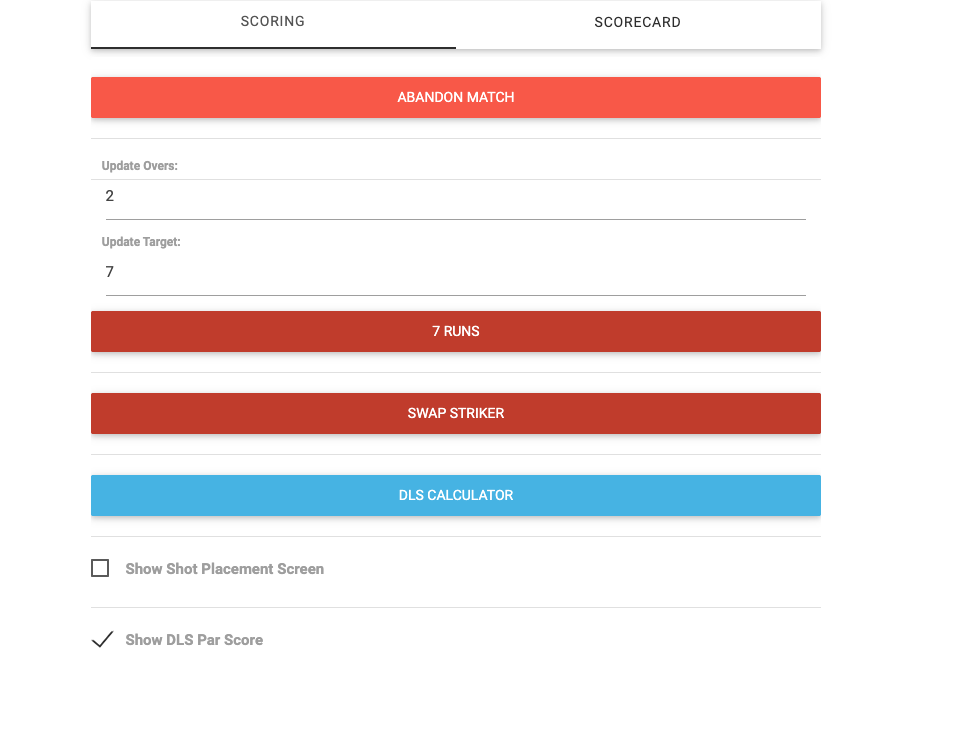
2. During the **second innings**, tap **More** to open the More screen.
3. Check the **Show DLS Par Score** box.
That's it. The par score will appear on the scoring screen immediately.
Your preference is remembered across sessions -- you won't need to re-enable it each time you open a match.
To hide the par score, go back to More and uncheck the box.
Where It Appears
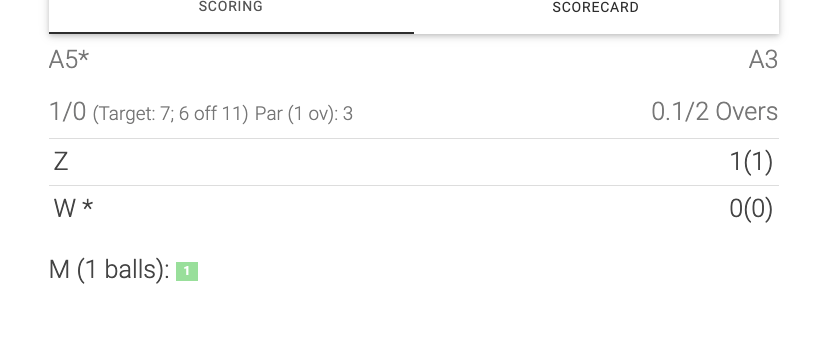
The par score shows up in the mini scorecard at the top of the scoring screen, right next to the target and required runs:
```Thunder* 120/3 (Target: 250; 130 off 40 overs) Par (11 ov): 92```
**"Par (11 ov): 92"** means: by the end of over 11, the batting team needs to be at **92 or above** to be ahead on DLS.
When It Updates
The par score recalculates automatically in two situations:
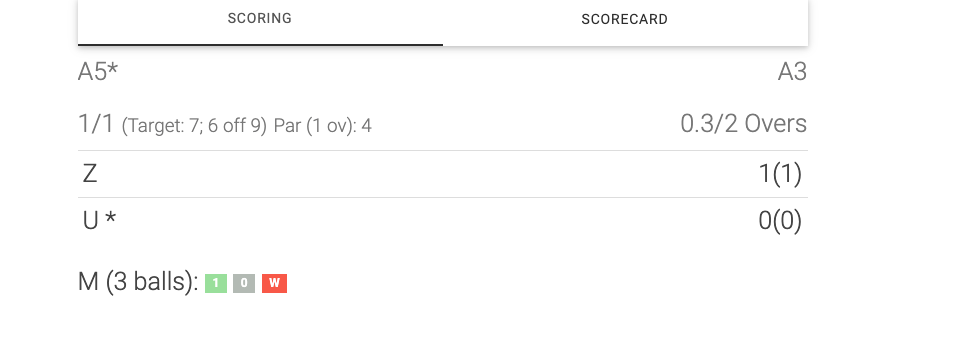
- **After each over completes** -- the par advances to the next over. Once over 11 finishes, it will show the par for end of over 12.
- **When a wicket falls** -- losing a wicket reduces the team's remaining resources, so the par score goes up. If a wicket falls during over 11, the par for end of over 11 is recalculated with the new wicket count.
You don't need to do anything. It happens in the background.
The par score recalculates automatically in two situations:
- **After each over completes** -- the par advances to the next over. Once over 11 finishes, it will show the par for end of over 12.
- **When a wicket falls** -- losing a wicket reduces the team's remaining resources, so the par score goes up. If a wicket falls during over 11, the par for end of over 11 is recalculated with the new wicket count.
You don't need to do anything. It happens in the background.
Reading the Par Score
| Display | Meaning |
| Par (11 ov): 92 | By end of over 11, you need 92 to be level on DLS || Score is **above** par | Batting team is ahead if rain stops play || Score is **below** par | Batting team is behind if rain stops play || Score **equals** par | Batting team would win by the narrowest margin | |
Example
50-over match. Team A scored 250. Team B is chasing.
After 10 overs, Team B is 75/2. The display shows **Par (11 ov): 92**.
- Team B needs to reach **92** by the end of over 11 to be on track per DLS.- They currently have 75, so they need **17 runs** in the 11th over to be at par.- If they score 20 in the over (reaching 95), they'll be **3 runs above par**.
If a wicket falls during over 11 (now 80/3), the par might jump to **Par (11 ov): 98** because losing a wicket means fewer resources remain.
When It Doesn't Show
The par score will not appear in these situations:
- **First innings** -- DLS par only applies to the team batting second.- **DLS not enabled** -- the tournament administrator hasn't turned on DLS for this tournament.- **Toggle is off** -- you haven't enabled it in the More screen.- **No internet connection** -- the par score requires a call to the server. If the connection drops, the par score will temporarily disappear and return when connectivity is restored.
Frequently Asked Questions
**Does enabling the par score change the match target or scoring in any way?**
No. The par score is purely informational. It doesn't affect the scorecard, the match result, or any other part of the scoring process. It's just a reference number for the batting team.
**Is this the same as the DLS Calculator?**
No. The DLS Calculator (also in the More screen) is used when rain actually interrupts play and you need to apply a revised target. The par score is a passive display that shows hypothetical DLS values as the innings progresses.
**Why does the par score go up when a wicket falls?**
In DLS, wickets are a resource just like overs. Losing a wicket means the batting team has fewer resources remaining, so they need to have scored more to be "ahead" if the match were curtailed.
**Can I use this in a T20 match?**
Yes. The par score works for any match format (T20, 50-over, or custom overs) as long as DLS is enabled for the tournament. The calculation automatically uses the appropriate G50 value for the format.
**Does enabling the par score change the match target or scoring in any way?**
No. The par score is purely informational. It doesn't affect the scorecard, the match result, or any other part of the scoring process. It's just a reference number for the batting team.
**Is this the same as the DLS Calculator?**
No. The DLS Calculator (also in the More screen) is used when rain actually interrupts play and you need to apply a revised target. The par score is a passive display that shows hypothetical DLS values as the innings progresses.
**Why does the par score go up when a wicket falls?**
In DLS, wickets are a resource just like overs. Losing a wicket means the batting team has fewer resources remaining, so they need to have scored more to be "ahead" if the match were curtailed.
**Can I use this in a T20 match?**
Yes. The par score works for any match format (T20, 50-over, or custom overs) as long as DLS is enabled for the tournament. The calculation automatically uses the appropriate G50 value for the format.